To place an order, choose a product and its options, add your design, check it on the review page and add it to your cart. At checkout you give your email and address, choose shipping and pay with PayPal or a card. You don’t need an account, and we check every file by hand before printing.
Step 1: Choose your product and options
Open the product you want from Business Cards, Cards & Postcards, Stickers & Labels or Flyers & Brochures. Pick the paper, size, finish and quantity. The price updates as you choose.
Step 2: Add your design
The last step on the product page, “Your design”, lists the ways that product can be designed:
- Start from blank: design it yourself in our online designer.
- Use a template: pick a finished design, then make it yours in the online designer.
- Upload your file: PDF, AI, EPS or SVG work best, and any file up to 100 MB is fine. If your file isn’t ready, choose “Skip, I’ll send my file later” and send it from your order page.
Not every product offers all three. If you’d like us to design it for you, see our business card design service.
Step 3: Check the review page
The review page shows your design and the full price. If you designed it online, it also lists anything our designer found to fix. Read it carefully, tick “I’ve checked my design and the details above.” and choose “Add to cart”.
Step 4: Check your cart
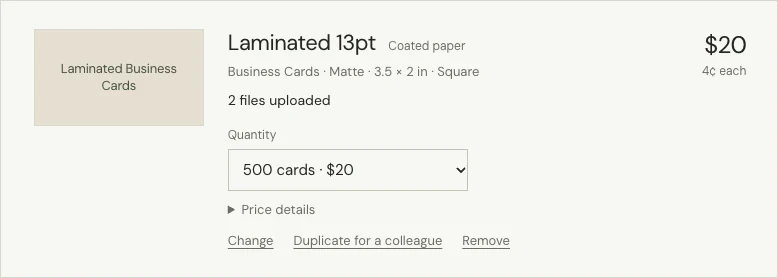
In your cart you can change the quantity, go back to change the options or design (“Change”), add a copy with its own design for a colleague (“Duplicate for a colleague”) or remove a line. Choose a shipping method to see the estimated arrival date.
Step 5: Check out and pay
- Enter your email. We send your receipt and order updates there.
- Enter the shipping address as it should appear on the parcel, with the apartment number, postal code and the recipient’s phone number.
- Add a promo code or a note for us if you have one.
- Choose shipping, then pay with PayPal, or with a debit or credit card through PayPal.
If you create an account before you pay, you get 15% off your first order, applied automatically. See Creating an account.
What happens after I order?
We email you a confirmation with a link to your order page. We check your files by hand, usually within 1 business day, and email you if anything needs fixing. You don’t need to approve a proof: once your files pass our check, your order goes into production. When it ships, we email you the tracking number.
To follow your order, see How to check your order status. For timing, see How long will my order take?